Request a quoteRequest a quote

How to translate text in AutoCAD: six methods, and what each leaves you to fix.

AutoCAD has no translate button. Drawing text is translated one of six ways, from retyping it by hand to an editor that writes the translation back into the DWG. For a few sheets, retype with the checklist below. For a set, use an editor that writes back.

What has to be translated on a sheet

Everything on the sheet that a person reads: general notes, callouts and leaders, the title block, schedules and tables, door and equipment tags, dimension text that was typed over, and text in blocks, including attributes. Some of it does not live in the drawing you opened. Text in an external reference sits in the referenced file, so it has to travel with the set.

Two things look like text and are not. Text converted to lines (Express Tools’ Explode Text) and text on a scanned sheet are geometry: they cannot be extracted as text and have to be retyped. Layer names are text, but a reader never sees them on the printed sheet.

Does AutoCAD translate drawings?

The language pack

switches AutoCAD’s own interface and documentation to another language, as Autodesk describes it. The text in your drawings stays exactly as it was drawn. Our post on how to change the language in AutoCAD covers the packs and the command names.

✕ Does not translate a note

The layer translator

renames layers to match a CAD standard. It does not touch a single note.

✕ Does not translate a note

No. AutoCAD has no command that translates the text in a drawing. Two features are often mistaken for one:

Translating a drawing means replacing every note, callout, title block entry and schedule, in the drawing itself.

The six methods, compared

Methods 1 and 2 are where the hours go, because retyping a label takes longer than translating it.

MarkMethodComes backRetypingTerms
M-01Retyped by hand in AutoCADA translated DWGEvery labelWhatever that person knows that day
M-02A table from a translatorA Word or Excel table of source and translationEvery labelThe translator's choice, unless you supplied a glossary
M-03DXF extraction into a translation toolA DXF, converted back to DWGIf it failsA term base, if the translator uses one
M-04A machine-translation plug-in in AutoCADThe same DWG with machine-translated textCheckedMachine translation; a glossary only if the plug-in accepts one
M-05An online AI translatorA translated DWG or DXF, depending on the serviceDependsA term base on some platforms
M-06Our editor in NEOLOThe DWG, translated in place and reviewedNoneYour approved term base, the same as the specification's

What goes wrong when you do it yourself

Most of these problems come from taking the text out of the drawing and putting it back. The longer French affects every method.

Problems by method

Where each problem lands

The six problems above, against the six methods. On method 6, we quote what has no drawing text separately and adjust the blocks the French runs past.

ProblemM-01Retyped by handM-02Translator tableM-03DXF extractionM-04MT plug-inM-05Online AIM-06NEOLO editorHits
P-01Notes come out in pieces
3 / 6
P-02Some text cannot be extracted
5 / 6
P-03Conversion can drop things
1 / 6
P-04French runs longer
5 / 6
P-05One label
3 / 6
P-06Drawing and specification disagree
5 / 6
  1. P-01Notes come out in pieces(methods 3 to 5). A multiline note can be extracted as several fragments, so a sentence gets translated piece by piece.
  2. P-02Some text cannot be extracted(all methods). Text converted to lines and scanned sheets have to be retyped.
  3. P-03Conversion can drop things(method 3). Translation guides warn that advanced objects do not always survive the DXF round trip, and that the files must be saved as Unicode for accented letters to come back intact.
  4. P-04French runs longer(all methods). TRANFORMER BANK ON, spelled as on the sheet, has 18 characters; BANC DE TRANSFORMATEURS SUR has 27. The block has to be rewrapped to stay clear of the outline beside it.
  5. P-05The same label gets several translations(methods 1, 2 and 4). On a 72-sheet set we translated, 62.6% of the words were repeated elsewhere in the set. When you translate one sheet at a time, every repeat is another chance to word it differently.
  6. P-06The drawing and the specification disagree(methods 1 to 5). A callout that points to a section has to use that section’s words. A plug-in, or a technician working sheet by sheet, won’t know them unless someone hands over the specification’s terms.

A handful of sheets

Translating a few sheets yourself: a checklist

For a handful of sheets, doing it in-house is reasonable. To keep it clean:

  1. Work on copies and bind or send the external references with them, so no text is missed.
  2. List the repeated labels first (general notes, tags, legends) and settle each one once, before you open the sheets.
  3. Take the words from the specification not from a dictionary, so the callout and the clause match. Our construction glossary gives 193 approved pairs to start from.
  4. Check that the text style’s font has the French accents (é, è, à, ç) before you type, so nothing comes back as a question mark.
  5. Leave room for the longer language and rewrap blocks rather than shrinking the text height.
  6. Have a second person read the sheets against the specification before they are issued.

When to stop doing it by hand

Past a few sheets, retyping costs more than translating. These are the signs:

  • S-01The set runs to dozens of sheets, or comes back for revisions.
  • S-02The specification is in the same package and has to say the same thing.
  • S-03You, or the engineer, are the one retyping, instead of drafting or designing.
  • S-04The drawings must be issued in both languages, and a wrong term would reach the owner: see bilingual drawings and shop drawings in French.

The method that removes the retyping: NEOLO's drawing editor

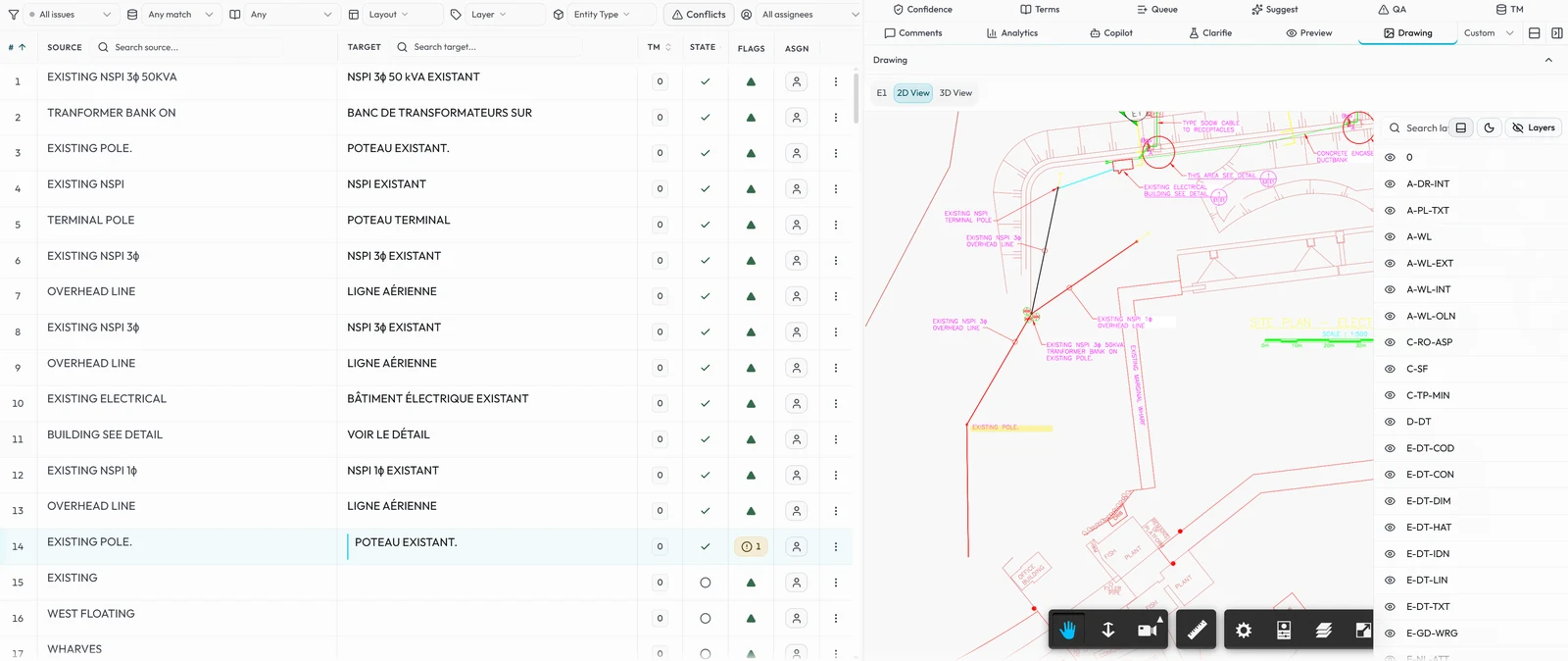
Our editor takes the text out of the DWG and writes the approved translation back in, so nobody retypes a label. We built it in NEOLO for this one job, and each step answers one of the problems above:

  1. 1No text is lost on the way out.The text comes out of the DWG itself, label by label, each in a numbered row.
  2. 2Nothing is translated out of context.Select a callout and the drawing zooms to where it sits.
  3. 3The drawing and the specification agree.Your approved terms and our QA checks run on every segment.
The NEOLO DWG editor on an electrical site plan: drawing callouts and their French translations in a grid on the left, the drawing itself on the right, zoomed to the selected callout

The editor, step by step

  1. 1No text is lost on the way outThe text comes out of the DWG itself, label by label. Each label becomes a numbered row, with the source on the left, the translation on the right and its status at the end of the row. Sheet numbers and units stay as issued.
  2. 2Nothing is translated out of contextThe sheet stays live beside the text. Select a callout and the drawing zooms to where it sits, so the translator sees what the label points at and how much room is left.
  3. 3Each repeat is settled onceA label translated once fills in everywhere it repeats: OVERHEAD LINE reads LIGNE AÉRIENNE every time it appears. On the 72-sheet set, that was 62.6% of the words.
  4. 4The drawing and the specification agreeYour approved terms and our QA checks run on every segment, from the same term base as the specification when it is in the package. When our specialists translate, a second linguist reviews the set.
  5. 5The translation goes back into the DWGEach label is written back into its own object, in the AutoCAD version you sent, with layers, layouts and geometry untouched: you open the files and edit them like any other sheet, and you check a translated set instead of retyping one. When our specialists translate, we adjust any block the French runs past after the write-back; on a dense sheet, your drafters decide the layout.

That is how a 72-sheet data centre set went from French to English: 49,589 words on the sheets, returned as DWG files. The specification followed, and its addendum drew on the drawings’ wording. On a road swing bridge, 101 electrical sheets went through as one set; on the last 33 added, 92% of the words were repetitions. Across all our work, we have translated over 4,000 AutoCAD drawings.

Sheets72

A data centre set, French to English, returned as DWG files.

Words on the sheets49,589

The text on the drawings

Repeated62.6%

Of those words appeared elsewhere in the set: each settled once.

Drawings translated4,000+

AutoCAD drawings translated across all our work.

It works with both of our two ways to work: an AI draft your own team reviews in NEOLO, or translation by our specialists. Either way, the drawing comes back as a DWG with the translation in place. See how our AutoCAD drawing translation works, step by step.

What does the editor translate in a DWG?

These objects, in model space and every layout, in tab order:

  • Single-line and multiline text, with each paragraph of a long note in its own row
  • Multileaders, including the text in their blocks
  • Block attributes, and text nested inside blocks
  • Tables, cell by cell, including merged cells and the text before or after a value
  • Dimension text that was typed over
  • Fields in multiline text, translated and written back as plain text (the field no longer updates)

What does it leave alone?

What must not change, and what has no text to write back into:

  • Measured dimension values, and table cells that hold numbers, dates or fields
  • Constant attributes, objects set to invisible and placeholders such as ####
  • Text inside an external reference: it stays in the referenced file, so send that file with the set and it is translated as its own drawing
  • Text converted to lines, PDF exports, scanned sheets, proxy objects and embedded OLE objects, which carry no drawing text: we quote them separately

Which AutoCAD version comes back?

The one you sent. Dates, scales and project numbers stay as issued.

Common questions

How do I change the language in AutoCAD?
Install a language pack from your Autodesk account and start AutoCAD in that language. It changes the menus and commands only; the text in your drawings stays as it was drawn.
Can AutoCAD text be translated automatically?
Partly. A machine-translation plug-in writes machine output into the drawing, and someone still checks every label. In our editor, your team reviews an AI first draft, or our specialists translate and a second linguist reviews; either way, the text goes back into the DWG.
Can I translate a PDF of the drawing instead?
You can translate the words, but a PDF carries no editable drawing text, so the translation cannot go back into a DWG. Someone has to retype it. We quote PDF and scanned sets separately.
Do you translate drawings from French to English?
Yes. The 72-sheet data centre set went from French to English, and the same term base works in both directions.
Can you check the drawings we already translated?
Yes. Send one recent translated drawing or deliverable and we will show you every term translated more than one way, in a free terminology check.